ChatGPT The Ultimate Beginner’s Guide to AI Chat Tool
Published: 3 Oct 2025

What Is ChatGPT? Understanding the AI Tool
It is an AI-powered chatbot created by OpenAI. It can chat like humans, answer questions, write essays, generate creative content and help with daily tasks. People use it to save time, learn and even have fun.
It works by analyzing large amounts of text from the internet. It learns language patterns and predicts responses. While it cannot think or feel, it is extremely good at providing useful answers.
Example: A student uses ChatGPT to draft a science essay in minutes. Instead of staring at a blank page, they get a starting point which they can edit and improve.
Table of Contents
How Does ChatGPT Work?
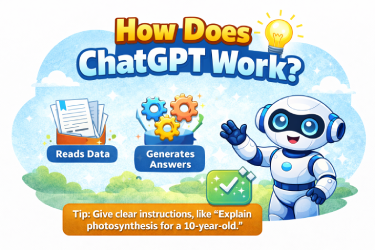
It is based on advanced machine learning models. It uses natural language processing (NLP) to understand your input and generate answers.
- It reads large datasets to learn how humans write and speak.
- It predicts the best answer based on context.
- Over time, updates improve accuracy and reduce errors.
Tip: Always give it clear instructions. For example, instead of “Explain science,” ask “Explain photosynthesis in simple words for a 10-year-old.”
Why People Use ChatGPT
People use AI tools because they make work easy. Students use them to finish homework and learn new things. Writers use them to get ideas and make stories. Workers use them to write emails and reports. Many people use them to practice languages or solve problems. These tools are always ready to help anytime. They act like a smart friend who gives answers and support whenever someone needs help.
- Quick Answers: Solve problems from school, work, or general knowledge.
- Writing Assistance: Generate blog posts, emails, or essays.
- Learning Aid: Understand complex topics easily.
- Fun and Creativity: Write stories, jokes, or creative scripts.
Example: A blogger uses it to create 5 variations of an article introduction, saving hours of writing time.
ChatGPT Versions Explained
AI tools have many versions. Old versions were simple and gave short answers. New versions are smarter and can write longer texts. They help with homework, stories, and daily tasks. Each new version is better than the last, making work and learning easier for everyone.
There are different versions of ChatGPT, mainly 3.5 and 4.
- ChatGPT 3.5: Faster, lightweight, suitable for simple tasks.
- ChatGPT 4: More advanced, detailed answers, better reasoning, may require subscription.
Example: Students often use 3.5 for homework summaries. Professionals prefer 4 for reports or research.
ChatGPT Stock Can You Invest?
You cannot buy stock in it or its maker, OpenAI, because it isn’t a company listed on the stock market.
Many people search for “chatgpt stock.” OpenAI is private, so direct investment is not possible.
- You can invest in companies partnering with OpenAI, like Microsoft.
- Research stock performance before investing.
- Follow AI industry trends for better investment decisions.
Example: A tech investor monitors Microsoft’s AI initiatives because of its partnerships.
Conclusion
ChatGPT is a helpful tool that saves time and makes learning easy. Students use it to understand homework and learn new topics. Writers use it to get ideas and improve their writing. Workers use it to complete daily tasks faster. It is available anytime and gives quick answers like a smart helper. Its simple explanations help people study work and enjoy learning without stress.
ChatGPT is a powerful AI tool for study work and daily life. It helps people learn faster think better and do tasks with confidence.fun.
- Explore it regularly to discover new features.
- Stay updated via release notes.
- Use it creatively for writing, learning, and entertainment.
- Combine its features with your own knowledge for best results.
FAQ
1. What is ChatGPT?
ChatGPT is an AI tool created to help people get answers quickly. It can explain topics, solve problems, and give suggestions. Students, writers, and workers use it to save time. It is smart, easy to use, and helps people complete tasks with clear guidance and support.
2. How can students use ChatGPT?
Students can use ChatGPT to understand homework and study topics faster. It gives simple explanations, answers questions, and provides examples. ChatGPT helps students learn step by step, practice, and improve skills. It also saves time and makes learning fun, so students can study without stress and feel more confident.
3. How does ChatGPT help writers?
Writers use ChatGPT to generate ideas and improve their content. It helps with writing stories, essays, and articles quickly. ChatGPT suggests new ways to express thoughts and corrects mistakes. This saves time, increases creativity, and supports writers to create better work. It is like having a helpful writing partner.
4. Can ChatGPT help workers?
Yes, ChatGPT helps workers complete tasks faster. It can answer work-related questions, organize information, and create documents. Workers can use it to save time on repetitive tasks and improve productivity. ChatGPT makes work easier, reduces mistakes, and provides guidance, allowing workers to focus on important tasks efficiently.
5. Is ChatGPT available all the time?
Yes. ChatGPT is available anytime online. Users can ask questions or get help whenever they want. This makes it like a smart assistant that never sleeps. Whether it is day or night, ChatGPT gives quick answers, explains topics clearly, and helps students, writers, and workers anytime they need support.
6. Does ChatGPT make learning fun?
Yes. ChatGPT makes learning easy and fun by giving simple explanations and examples. Students can explore new topics without confusion. It explains step by step and answers questions quickly. Using ChatGPT reduces stress and makes studying enjoyable. Children and adults both find it helpful for learning new things.
7. Can ChatGPT replace humans?
No. ChatGPT cannot replace humans. It is a tool that helps people complete work, learn, and make decisions. Humans guide how ChatGPT is used and control its output. It supports humans but cannot think independently or make final decisions. ChatGPT works best when people use it wisely.





- Be Respectful
- Stay Relevant
- Stay Positive
- True Feedback
- Encourage Discussion
- Avoid Spamming
- No Fake News
- Don't Copy-Paste
- No Personal Attacks
- Be Respectful
- Stay Relevant
- Stay Positive
- True Feedback
- Encourage Discussion
- Avoid Spamming
- No Fake News
- Don't Copy-Paste
- No Personal Attacks
