Cloud Computing Simple Secrets to Learn 2026
Published: 27 Feb 2026

Cloud Computing Simple Secrets to Learn 2026 explains how cloud computing delivers computing and IT services over the internet on demand. Users can access services like storage, databases, and processing power from a cloud provider without buying or managing physical servers. This pay-as-you-go system makes technology easy and cost-effective, letting beginners and businesses use powerful tools without owning data centers.
What Is Cloud Computing?
Cloud computing means using the internet to store, manage, and access data instead of saving it on your computer or phone. With cloud computing, you do not need large hard drives or servers at home. Services like Google Drive, Dropbox, and OneDrive are examples of cloud computing. You can save photos, videos, documents, or apps online.
Cloud computing also makes it easy to work from anywhere. For instance, you can start writing a document on your laptop at home and continue it on your phone while traveling. This convenience is the main reason cloud computing is widely used by beginners and professionals alike.
How Cloud Computing Works
Cloud computing works by connecting your device to a network of powerful computers called servers. These servers process data, run applications, and store files. When you open an app or website, the server sends the information to your device instantly. For example, YouTube videos come from cloud servers, not your phone storage.
It also allows multiple users to access the same application at the same time. Cloud computing uses the internet to provide storage, software, and resources anytime. This system makes technology faster, flexible, and easy for beginners to use in daily life.
Key Features of Cloud Computing
Cloud computing has several key features that make it special. First, it provides on-demand access, meaning users can get services whenever they need them. Second, it is scalable, so you can increase or decrease storage or resources as needed. Third, it offers flexibility, allowing access on laptops, phones, or tablets.
Other important features include cost-effectiveness, since you pay only for what you use, and reliability, as data is backed up on multiple servers. These features make cloud computing ideal for students, businesses, and everyday users who want convenience and security.
Types of Cloud Computing Services
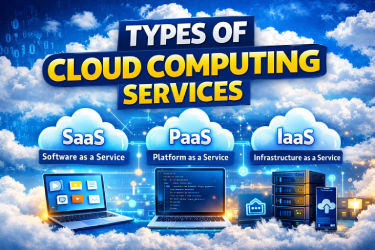
There are three main types of cloud computing services. Software as a Service (SaaS) provides apps online, like Gmail, Google Docs, and Zoom. You can use them directly without installing anything. Platform as a Service (PaaS) offers tools for developers to create applications, such as Google App Engine.
Infrastructure as a Service (IaaS) gives virtual servers, storage, and networks, like Amazon Web Services. Each type has its own purpose. Beginners usually start with SaaS because it is easy to use, while businesses use PaaS and IaaS to build and manage applications efficiently.
Cloud Deployment Models: Public, Private, Hybrid
Cloud deployment models describe how cloud computing resources are shared. Public cloud is available to anyone, like Google Drive or Dropbox. Private cloud is used by a single organization to ensure security and control. Hybrid cloud combines public and private clouds, letting organizations share data safely while using public services for other needs.
Each model has benefits depending on the user. Small businesses may prefer public cloud because it is cheap. Large companies often use private or hybrid clouds to protect sensitive information. Understanding these models helps beginners use cloud computing effectively.
Benefits of Cloud Computing
Cloud computing offers many benefits for users and organizations. It saves money because you do not need expensive servers. You can work from anywhere using a laptop, phone, or tablet. Apps update automatically, so you do not need to manage updates yourself.
Another benefit is real-time collaboration, where multiple people work on the same file simultaneously. Businesses can grow faster without buying extra hardware. Students can submit homework online using cloud apps. Overall, cloud computing improves productivity and convenience for beginners and professionals alike.
Drawbacks of Cloud Computing
Cloud computing has some disadvantages. You need internet access to use most cloud services. If your connection is slow, apps may lag or not work properly. Data privacy is another concern because files are stored online, so strong security is necessary.
Other drawbacks include higher costs if extra storage or features are used. Servers can also have downtime, temporarily stopping access. Despite these issues, cloud computing is still very useful. Beginners can reduce risks by following simple security tips and monitoring usage.
Cloud Computing Examples and Use Cases
Cloud computing is everywhere in daily life. Google Docs lets you write and save files online. Netflix streams videos from cloud servers instead of your device. Dropbox stores files so you can share them with others easily.
Businesses also use cloud computing for email, apps, and backup systems. Schools use cloud apps for online learning and homework submission. These examples show that cloud computing is not only for tech experts. Beginners can also use it to save time, work from anywhere, and access resources easily.
Cloud vs Traditional Web Hosting
Traditional web hosting stores a website on a single server. Cloud hosting stores websites across many servers. This makes cloud hosting faster, more reliable, and scalable. Websites using cloud hosting can handle more visitors without slowing down.
Traditional hosting is less flexible and may crash if traffic is high. For example, a small online store can use cloud hosting to grow without buying new hardware. Beginners choosing a hosting plan should consider cloud hosting for speed, reliability, and future growth.
Top Cloud Service Providers
The biggest cloud providers offer storage, servers, and apps. Amazon Web Services (AWS) is popular for businesses and websites. Microsoft Azure provides tools for developers and companies. Google Cloud offers easy-to-use apps and storage solutions.
IBM Cloud focuses on enterprise solutions. These providers give beginners and organizations access to powerful cloud computing resources without buying servers. Many beginners start with free tiers from AWS or Google Cloud to learn how cloud computing works safely.
Cloud Computing Security Tips
Security is very important in cloud computing. Use strong passwords and change them regularly. Turn on two-factor authentication for extra safety. Backup important data so you do not lose it.
Avoid sharing sensitive files publicly and keep your apps and devices updated. Security measures protect data from theft, viruses, and accidental deletion. Beginners can start with trusted services like Google Drive and Dropbox. Following these tips ensures cloud computing is safe and reliable.
How Cloud Helps Organizations
Organizations use cloud computing to save time and money. Teams can share files instantly from any device. Businesses run apps without buying servers or storage. Schools use cloud apps for online classes, assignments, and grading.
Hospitals use cloud systems for patient records. Startups can launch apps without large investments. Cloud computing also allows remote work, so employees can work from home or travel. These benefits make cloud computing essential for modern organizations.
Future Trends in Cloud Computing
The future of cloud computing is exciting. Artificial intelligence (AI) will work in the cloud to provide smart apps. Edge computing will process data closer to users for faster speed. IoT devices will connect through cloud servers.
Automation will reduce manual work for businesses. Cloud computing will become faster, safer, and smarter. Beginners can expect more apps, online tools, and services that rely on cloud computing. Understanding these trends helps people stay ready for new technology in 2026.
Operating Systems and Cloud
Cloud computing works with all operating systems. Windows, macOS, Linux, Android, and iOS can access cloud apps. You can open Google Docs on a phone, tablet, or laptop and continue work from anywhere.
Businesses use different operating systems to run cloud apps. Students can submit homework using tablets while teachers access it on a computer. Cloud computing ensures devices work together smoothly. Beginners do not need to worry about compatibility because most services are designed for all systems.
Final Thought
Cloud Computing Simple Secrets to Learn 2026 show how easy and powerful cloud technology can be. It helps beginners and businesses save time, work from anywhere, and use advanced tools without owning servers. While there are some risks like security and internet dependency, following simple tips makes cloud computing safe and reliable. By understanding its features, types, and benefits, anyone can start using cloud computing confidently. Start exploring today and see how cloud technology can make work and learning faster and smarter.
FAQ
Cloud Computing Simple Secrets to Learn 2026 shows that cloud computing is using the internet to access computing services like storage, databases, and apps without needing your own servers. Instead of saving files on your computer, cloud computing lets you store and use them online. You can work from any device, share files easily, and use powerful tools without buying expensive hardware. Popular examples are Google Drive, Gmail, and Dropbox.
The main types of cloud computing are:
- Public Cloud – Services shared with many users, like Google Drive.
- Private Cloud – Services used by one organization for security.
- Hybrid Cloud – Combination of public and private cloud.
- Community Cloud – Shared by several organizations with similar needs.
Each type serves different needs, and beginners usually start with public cloud because it is easy and free to use.
Yes! Beginners can learn cloud computing in 3 months if they follow a plan. Start with basic concepts, understand storage, servers, and services, and practice using apps like Google Drive, AWS Free Tier, or Microsoft Azure. Try creating small projects, like hosting a website or storing files online. Learning step by step, using videos, tutorials, and hands-on practice, makes it easy to understand cloud computing even in a short time.
Some popular examples of cloud computing include:
Online Banking – Stores transaction data securely in the cloud.
These examples show that cloud computing is part of daily life and can be used by beginners and businesses alike.
Google Drive – Store and share files online.
Dropbox – Backup and access files from anywhere.
Netflix – Streams videos from cloud servers.
Gmail – Email service that works online.




- Be Respectful
- Stay Relevant
- Stay Positive
- True Feedback
- Encourage Discussion
- Avoid Spamming
- No Fake News
- Don't Copy-Paste
- No Personal Attacks
- Be Respectful
- Stay Relevant
- Stay Positive
- True Feedback
- Encourage Discussion
- Avoid Spamming
- No Fake News
- Don't Copy-Paste
- No Personal Attacks
