Top Benefits of Computing That Make Life Easier
Published: 4 Nov 2025
Have you ever wondered what people mean when they say computing? The word sounds big but its meaning is quite simple. In today’s world everything we do is linked with computing. From using a smartphone to playing games or sending messages computing helps us at every step.
So, let’s define computing in simple words and learn how it shapes our daily life. Are you ready to understand this basic yet powerful concept?
What Does Computing Mean?
Let’s start with a simple definition.
Computing means using computers to solve problems or perform tasks.
It includes everything that involves data processing, calculation and logical operations. When you type a message, search the web or calculate numbers you are using computing.
In short, computing is about how we make computers work for us to get things done.
Simple Example of Computing
Think about your smartphone.
When you open an app, send a text or use GPS your device processes data to show results. This process is computing in action.
A student using a calculator for math, a shopkeeper checking sales on a computer or a doctor viewing reports on a screen all are real life examples of computing.
Computing is not just for experts. It is for everyone who uses any device that works through data.
Why Computing Matters Today
Computing is the heart of modern life. It powers industries, businesses, hospitals, schools and even our homes. Without computing, we couldn’t enjoy online learning, digital banking or social media.
Here’s why it matters:
- It helps us store and manage data easily.
- It makes communication faster.
- It allows us to analyze problems quickly.
- It supports automation, saving time and effort.
Imagine life without computing. No online classes, no digital payments, no navigation apps. That’s how important computing is in our world.
Different Areas of Computing
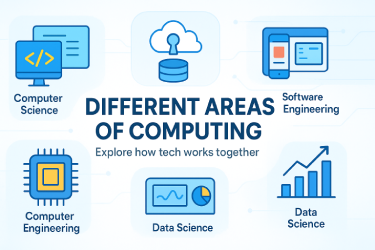
Computing is a broad field. It covers many areas that work together to make technology useful. Let’s look at a few of them in simple terms.
1. Computer Science
Computer science is the study of how computers think and solve problems. It includes programming, algorithms and system design. When you see apps or websites, they are made using computer science.
2. Information Technology (IT)
IT focuses on using computers to store, protect and share data. Offices, banks and schools use IT to keep records and communicate safely.
3. Software Engineering
Software engineering is about creating useful programs. It involves writing, testing, and maintaining software that people use daily, like browsers, games, and tools.
4. Computer Engineering
This area combines hardware and software. It deals with building computers and improving their performance.
5. Data Science
Data science uses computing to study large amounts of data. Businesses use it to make smart decisions.
Each area plays a special role in making computing more powerful and helpful.
Types of Computing
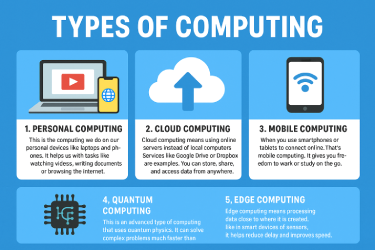
Computing comes in many forms. Let’s explore some common types you often see around you.
1. Personal Computing
This is the computing we do on our personal devices like laptops and phones. It helps us with tasks like watching videos, writing documents or browsing the internet.
2. Cloud Computing
Cloud computing means using online servers instead of local computers. Services like Google Drive or Dropbox are examples. You can store, share and access data from anywhere.
3. Mobile Computing
When you use smartphones or tablets to connect online, that’s mobile computing. It gives you freedom to work or study on the go.
4. Quantum Computing
This is an advanced type of computing that uses quantum physics. It can solve complex problems much faster than normal computers.
5. Edge Computing
Edge computing means processing data close to where it is created, like in smart devices or sensors. It helps reduce delay and improves speed.
How Computing Works
Computing follows a simple process called the Input Process Output Cycle.
- Input: You give data to the computer (typing, clicking, speaking).
- Process: The computer works on that data using software or instructions.
- Output: You get results, like a message, image or report.
For example, when you type “weather today” in a search bar:
- Input: You type the text.
- Process: The system checks data from weather servers.
- Output: It shows today’s forecast.
This basic cycle happens every time we use any computing device.
Benefits of Computing
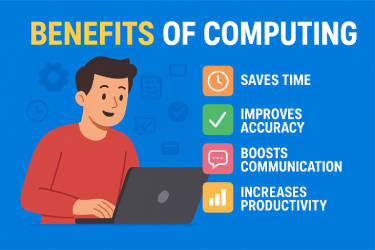
Computing plays a big role in making our life easy, smart and fast. It helps us finish work quicker, stay connected and learn new things every day. Let’s look at the main benefits of computing and see how it changes our daily life.
1. Saves Time
One of the biggest benefits of computing is how much time it saves.
Tasks that once took hours or days can now be done in minutes. For example, writing reports, making bills or sending messages can all be done instantly on a computer.
Computers work faster than humans. They can handle large amounts of data without getting tired. In offices, employees can finish projects faster using tools like spreadsheets and databases.
Real-life example:
A shop owner can use a billing program to print dozens of invoices in seconds instead of writing them by hand.
2. Improves Accuracy
Computers are very accurate. They follow instructions exactly and do not make mistakes like humans do when tired or distracted.
In schools, teachers use computers to check test results quickly. In hospitals, doctors use computers to record and study patient reports without errors.
Real-life example:
An accountant using a computer program can calculate expenses and profits correctly every time, saving both money and time.
3. Boosts Communication
Computing has completely changed how people communicate. With the help of emails, chat apps and video calls people can stay in touch no matter where they are.
It also helps businesses connect with customers. For example, a company can send updates or offers to thousands of users at once through automated messages.
Real-life example:
A student can attend an online class through Zoom while talking face-to-face with the teacher, even from another city or country.
4. Increases Productivity
Computing helps people do more work in less time. It provides tools that make jobs faster and more organized. Workers can handle many tasks together using automation software.
For example, in offices, data entry, file management and report writing are done using computers. This helps save effort and increases overall work performance.
Real-life example:
An office team can use project management software like Trello to track tasks and meet deadlines easily.
5. Enhances Learning
Computing has changed the way we learn. It gives access to a wide range of information through the internet. Students can study anytime and anywhere.
With online learning tools, teachers can create lessons using images, videos, and quizzes to make studying more fun. It also helps students learn at their own pace.
Real-life example:
A teacher can design online lessons using tools like Google Classroom. Students can join from home, watch videos and submit homework online.
6. Helps in Decision Making
Computing allows people and businesses to make better choices. With data analysis tools, we can study facts, find patterns and make smart decisions.
For example, companies use computers to check customer data and see what products are selling best. This helps them plan better for the future.
Real-life example:
A small business owner can use a spreadsheet to see which products make the most profit and decide what to stock more.
7. Improves Healthcare
Computing is helping doctors and hospitals in big ways. Medical records, scans and lab reports are stored and checked through computer systems.
It helps in faster diagnosis and better treatment. Health apps also let people track their fitness and health at home.
Real-life example:
A doctor can quickly look at a patient’s medical history on a computer before giving treatment.
8. Promotes Creativity
Computing gives people tools to create music, videos, designs and games. Artists, writers and designers all use computers to bring their ideas to life.
With the help of software like Photoshop or Canva, even beginners can create professional designs.
Real-life example:
A student can use a simple drawing app to make a digital art project and share it online with friends.
9. Supports Business Growth
Businesses depend on computing for marketing, sales and customer service. Online advertising,
e-commerce, and automated systems help companies grow faster.
Real-life example:
A clothing brand can use social media ads and data analysis tools to attract more customers and increase sales.
10. Makes Life More Convenient
From paying bills to booking tickets, computing makes everything easier. You can shop, learn, and work from home without wasting time in queues or traffic.
Real-life example:
People can use mobile banking apps to transfer money or pay bills within seconds without visiting a bank.
Final Thought
Computing is not just a part of technology it’s a part of life. It saves time, improves accuracy, and helps us stay connected. It changes how we learn, work and live.
When used wisely, computing can make life more comfortable and meaningful. So, the next time you use a phone, computer, or tablet, remember you are using the power of computing to make your day easier.
Drawbacks of Computing
While computing has many benefits, it also has some drawbacks we should know about.
- It can cause overdependence on technology.
- It may lead to data security risks if not managed safely.
- It can reduce human interaction when everything goes digital.
- It sometimes causes health issues like eye strain due to long screen time.
To balance things, we must use computing wisely and safely.
Real Life Example of Computing in Daily Life
Let’s take an easy example.
A small bakery uses a computer to manage orders and payments. Instead of writing everything on paper, the owner uses simple software to track sales, calculate totals, and print bills.
This is a perfect example of computing helping small businesses become more efficient and organized.
How Computing Has Changed the World
Computing has changed how we live, work and communicate. In the past, people stored data on paper. Now everything is digital.
Here are a few big changes brought by computing:
- Online education and learning platforms
- Smart homes and AI-powered devices
- Digital payments and online shopping
- Healthcare monitoring systems
- Cloud storage and remote work options
Each of these examples shows how computing continues to make our world faster and smarter.
Future of Computing
The future of computing looks exciting. New trends like artificial intelligence, machine learning, and quantum computing are shaping the next generation of technology.
We may soon see computers that can think and learn like humans. Robots will do more daily tasks, and data will guide smart cities.
As computing grows, learning its basics becomes even more important. The more we understand computing, the better we can use it to improve our lives.
Tips to Learn Computing Fast
Here are some easy steps you can follow to understand computing better:
- Start with the basics – Learn how computers process data.
- Watch online tutorials – Simple videos can explain concepts visually.
- Practice daily – Use your computer for small tasks to gain confidence.
- Learn basic programming – Try simple languages like Scratch or Python.
- Join online forums – Discuss ideas and learn from others.
Remember, computing is not hard. It just needs practice and curiosity.
Conclusion
Now you clearly understand what Define Computing means and why it matters. Computing is more than just using a computer it’s about solving problems, saving time and making life easier.
Every time you use a phone, send an email, or search online, you are part of the world of computing. It’s simple, powerful, and growing every day.
So, start learning step by step. Ask questions, try new things, and explore how computing shapes your world. The more you learn, the smarter you become!





- Be Respectful
- Stay Relevant
- Stay Positive
- True Feedback
- Encourage Discussion
- Avoid Spamming
- No Fake News
- Don't Copy-Paste
- No Personal Attacks
- Be Respectful
- Stay Relevant
- Stay Positive
- True Feedback
- Encourage Discussion
- Avoid Spamming
- No Fake News
- Don't Copy-Paste
- No Personal Attacks
